Your profile can look however you want. Layouts are made with CSS, the same way they were on MySpace.
This page shows you how, with an example layout you can copy. For smaller tweaks, see Layout Snippets.
Paste your CSS into the About me box, between <style> and </style>. It can go before or after your normal About me text.
Click Preview at the bottom to see it on your profile before anyone else does. When it looks right, click Save All Changes.
Old MySpace layout codes were made for MySpace's page, not this one, so most of them only half work here.
Use the class names below to fix them up.
Example layout
Here's a simple layout that recolors everything. Copy it, paste it into your About me between <style> and </style>,
and change the colors to whatever you like.
Log in to try layouts on your own profile without saving them.
The lines like /* Background */ are notes to help you find your way around. The site removes them when you save, which is normal.
Images in your layout
The best way to add images (backgrounds, banners, buttons) is to upload them to your Photos first,
then use that photo's address in your layout. Right-click the photo, copy its address, and use just the part starting with
uploads/photos/. That way they'll always work.
You can use images from other websites too, but AniMySpace saves its own copy when you save your profile, and some won't make it:
Images over 5 MB or bigger than 4000x4000 pixels
Anything that isn't a JPG, PNG, GIF or WebP
Images from sites that block downloading
More than 25 new outside images in one save
If an image disappears after you save, upload it to your Photos instead. Outside images don't show up in Preview until you save.
Customizing your Contact box
The "Contacting" box has the class .contactbox. Here are three ways to change it, from easy to fancy.
1. Recolor it
2. Hide a button. This hides Rank User. Swap in another one from the list below.
(Hiding a button only hides it on your profile. People can still do it from elsewhere.)
Send Message: a[href*="to="]
Forward to Friend: a[href*="forward="]
Add to Friends: a[href*="do=friend"]
Add to Favorites: a[href*="do=favorite"]
Instant Message: a[href^="im.php"]
Block User: a[href*="block"]
Add to Group: a[href^="group_invite.php"]
Rank User: a[href^="rank.php"]
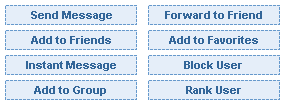
3. Use your own picture. The old MySpace trick: the real buttons turn invisible, and your own image shows behind them.
Clicking where your picture says "Add to Friends" clicks the real button underneath.
Download the template below. It's the exact size of the box, and the dashed boxes show where each button is.
Draw your own design over it in Paint, Photoshop or anything else. Keep each button inside its dashed box.
Musician profiles also have .playerbox (the music player), .showsbox (upcoming shows) and .genres.
Tip: to style just one of the boxes that share a class, use :has(). For example, .biobox:has(.friendsbox) is only your Friend Space.
What isn't allowed
To keep everyone safe, some things are removed when you save:
Scripts, forms, embeds and iframes
Outside fonts and stylesheets (@import, @font-face)
Old tricks like expression(), behavior and data: addresses
Everything else, including colors, backgrounds, borders, fonts already on people's computers, sizes, hiding things, position: fixed and @media, is fair game. Have fun!